Showing posts with label Technical. Show all posts

Monday, December 05, 2011

Lightroom 3 Video Add-on

As Posted Direct from GeekyGadgets.com – Check Them Out!

By Julian Horsey on Friday 2nd December 2011 1:02 pm in C


Knobroom MIDI Controller Add-on Created For Adobe Lightroom 3 (video)

A free add-on for Adobe Lightroom called Knobroom is available that will allow you to control the creative adjustments of photos using physical sliders and knobs from a Midi controller with Adobe’s Lightroom  3 software.

The software add-on has been around for sometime but is a great way to add a new style of creativity to your photography and image creation. Watch the video after the jump to see it in action.

Knobroom

Unlike other software Knobroom is available for Mac OS X systems and has been created to provide a direct manipulation add-on for Adobe Photoshop Lightroom 3.

If you fancy adding a little more creativity to your imaging and photography you can now download Knobroom for free.

Wednesday, August 17, 2011

Video Snapshot

With the rise in video recording by DSLR cameras, I hear more often where people are wishing they could get a picture from their video.  But how do you do that?  This is just one of the many ways to grap a “snapshot” from your video using a standard program that many computers have – NERO.

Using Nero, simply import your file (upper right corner), drag your video from the video log into the video track.  Almost Done…press the play button to watch the video play, and as it does, simply click on the camera icon located below the running video.  As you click on the camera icon, a snap shot of the video image will automatically be saved to your pictures file!  Note : Be sure your video is good quality, otherwise the snapshot image will be of low resolution as well.

image

Saturday, April 30, 2011

The Royal Wedding In Photosynth

Just in case you didn’t get enough of the Royal Wedding yesterday, and you really wanted to get a closer look at the details of the event, here is your opportunity.  Photosynth, is a technique that combines the photographs taken from different angle but are overlapped. You can zoom in different parts of the image and see it from different angle thus giving you a 3D view.  Click the image below to begin - Enjoy Smile

Royal Wedding Far view

Saturday, April 23, 2011

SoftStep Key Worx

I happened to see this in a Facebook ad last night.  Interesting concept.

SoftStep Keyworx
  • Keystrokes: send any key plus modifiers to any application
  • Mouse Control: move the cursor, click or double-click left or right
  • Open and Focus: launch programs, folders and files, and bring windows forward
  • Navigation Pad: use as arrow keys or for pixel-precise control of the cursor

Monday, April 04, 2011

GoPro 3D

This is so cool, and really affordable too – make your own 3D movies with the amazing GoPro camera system.  I watched this sample Highlight Reel using my daughter’s “Barbie 3D glasses” and it looks incredible!  I am really wanting to get a GoPro camera, not only for the water proof and shock resistant housing, but for the amazing quality that comes from this little guy!  You have seen these cameras in action before – you just may not realize it!  Anytime you are watching a sporting event, or a show like Wipe Out – you will see the contestants wearing one of these, giving the viewer a first hand account of their spills!

GoPro 3D

Sunday, March 27, 2011

Color–The New Photo-Sharing App

image

This past Wednesday I caught a quick review on CNN on this new app "Color” by Bill Nguyen.  The app launched on the same day has had over $40 million in backing, and is known as the picture version of Facebook and twitter.  The app allows users to share with anyone and see the pictures that other people in their area are taking.  Nguyen describes the app  “like social media on steroids”.  Not sure I really want to get my social media images hopped up on steroids at this time Smile, however I really like the fact that the app was designed for both iPhone and android.  It will be interesting to follow the stats.

Friday, March 25, 2011

White Balance Quick Trick

Lightenupandshoot.com

We often don’t have the benefit of having an 18% grey card with us on a shoot, but there are little tips and tricks to help you obtain the correct white balance.  Today I found this short video by Lighten Up and Shoot Photography.  It gives an easy method using Photoshop to obtain a very balanced look. 

Main Tip:  2 out of the 3 colors (RED, GREEN or BLUE) are close to 128.

Monday, March 07, 2011

Google Chrome

At first I had no idea what Google Chrome was – I simply wanted to have Google Earth on my laptop and Chrome was offered – Junk, I figured, and I passed it by.  Recently however I have noticed a few news tid bits about Google Chrome, and decided to look into it more thoroughly.  Basically - Google Chrome is a web browser – much like Internet Explorer, Fire Fox and Safari – but faster.  Google Chrome is available for PC and Mac users alike – and works great on both!  An incredibly easy to use browser, that even comes with it’s own online webstore for adding apps.  PS – If you play games online – this may just give you that extra advantage you’ve been looking for Winking smile

Check out a few of the perks of Google Chrome…

  • Speed

    Chrome is designed to be fast in every possible way: It's quick to start up from your desktop, loads web pages in a snap, and runs complex web applications fast. Learn more about Chrome and speed.

    Watch video

  • Simplicity

    Chrome's browser window is streamlined, clean and simple.

    Chrome also includes features that are designed for efficiency and ease of use. For example, you can search and navigate from the same box, and arrange tabs however you wish — quickly and easily.

    Watch video

  • Security

    Chrome is designed to keep you safer and more secure on the web with built-in malware and phishing protection, autoupdates to make sure the browser is up-to-date with the latest security updates, and more. Learn more aboutChrome's security features.

    Watch video

  • And more features

    Chrome has many useful features built in, including extensions, translation in the browser, themes, and more. Learn more about Chrome's newest and most-loved features.

Wednesday, December 08, 2010

Photoshop User TV

I have enjoyed the tips and tricks of this online program for probably a couple of years now.  It’s filled with great tutorials and insider information for Photoshop and Lightroom users on every level.  Each week the guys put together several tutorials, a contest, and of course, show off the latest Photoshop User Magazine.  What’s more…the cast includes Canadian, Dave Cross, who each week proudly wears his Canadian attire :D.  Episodes can be downloaded as well for review.  Check it out at PHOTOSHOPUSERTV.COMimage

Friday, December 03, 2010

At The Races

Like any area of photography, sports photography has its on set of challenges.  Being able to find and focus in on your subject in a split second, and getting that tack sharp action can be your biggest challenge.  Here are a few tips on getting your action shots – maybe even some shots of the kids as they are racing around at Christmas this year!

1.  Know your sport.  The better you know your sport ie. hockey, the more you will understand the game, and be able to anticipate the players next move.

2.  Increase Your ISO Settings.  Higher ISO settings will allow you to use higher shutter speeds when lighting conditions are less than ideal.  Be careful not to go too high though or you will have grainy images.

3.  Fast Shutter Speed.  Be sure to use faster shutter speeds ie. 1/800 sec  and higher.  These images below were all shot at 1/1600 sec F4.5 ISO 400

4.  Take Lots Of Shots.  It’s Digital – so go ahead – Take Lots!  Chances are by doing so you’ll catch something amazing!

Horse 1 Horse 2 Horse 3

Monday, November 29, 2010

Compare Cameras For Christmas

If you are looking at picking out a camera for Christmas and are trying to narrow down the options to choose the camera that best suits your needs – Snap Sort will be a huge help for you.  Snapsort allows you to Explore, Sort, and Learn more about the cameras on the market.  Once you have narrowed your options down with the snapsort information, simply type in the camera models you are looking at and click “compare”.  You will then be able to view the detailed differences between the models and giving you the overall score to which camera is superior.  Snapsort.com

image

Wednesday, September 15, 2010

Same View – Different Settings

So I was on my way out of town last night to do some sunset pictures at a specific location and I decided to stop on the side of the road to take a couple of shots to show how the same picture can look so so different with simply changing your settings.

The first image was literally point and shoot – My camera was on aperture priority,f2.5 1/2000sec with a 50mm 1.4 prime lens.  (a 50mm prime isn’t exactly what I would normally use to do a landscape shot, but like I said, this was just pick up the camera as is and shoot)

1

The difference between the first and second images has nothing to do with me changing my aperture, f-stop, or ISO settings.  I left everything alone, what I did change was my metering system – I changed from evaluative to spot metering.  As a result, the camera sensor system changed my shutter speed to 1/8000 from 1/2000, causing much more of the detail to appear in the sky.

2 

The final image I took the information from the first 2 shots and tweaked it by deciding to bring in more detail in the clouds – and changing my settings to:  1/800 f16

3

It was a beautiful sunset :D

Tuesday, September 14, 2010

Never Stop Learning

Cameras are always changing, and the field of photography is always diversifying.  As a result, if you are wanting to be in the field of photography you can Never Stop Learning.  Personally I try to take a course at least once every other month – sometimes it just means repeating a course to get something new out of it, other times it is something totally new that the industry has to offer.  It doesn’t matter, as long as I am challenging myself.   The average full day class with a world class photographer works out to almost $1000 CAD/day, and I understand that this is simply not feasible for most (myself included-though I would absolutely love to attend an MJ2 Day Workshop)…but alas, there are many other ways to learn, even though the “experience” of shooting  side by side, and the interaction you would like with your photographer mentor is not available. But there are ways to  keep up with the latest in what you can offer your clients and take advantage of what your equipment can do for you.  To begin, DVD training, it may not give you live interaction, however, you will have the advantage of reviewing it over and over.  Next,  E-Classes, many of these classes that you take will come with the option of purchase as well, so if you do find the information too much to take in all at once, you can review it later.  Webinars are another option, and you are able to have an interaction with the speaker on these, either through voice or typed questions and comments.  And of course, there is YouTube!  If you ever want to know how to do something, chances are, someone has posted a video on it on YouTube.  Below I have posted a screen captured for the site Creative Live – an incredible teaching tool which recently completed a week long class of epic proportions – putting them on the map for all time by having Jasmine Star teach for 5 Days, including shooting a wedding live! There are so many training resources out there; what are your favourites?

creative live

Wednesday, July 28, 2010

Walmart & Facebook

Most of us post pictures on facebook.  We share our images with our friends, and love to see our friends images.  For those who are concerned as professional photographers however, you may wish to be aware that Walmart has hooked up with Facebook and now has an add on that allows you,  to print yours, or any of your facebook friends pictures directly from the Walmart site.  There are two options if you are worried about this, one is described in the video below – which is very easily laid out on how to block Walmart from accessing your account.  The other point I would like to make however is to be sure you resize your images prior to uploading to Facebook.  Firstly this will allow you to avoid that L O N G upload time of uploading a full size file.  Secondly, if you resize your image to 800x600 or less, then the print quality that anyone would receive from trying to print your resized images would be pitiful.   In addition, it appears that this is not currently available through Walmart.ca, only at the .com site. 

Sunday, July 25, 2010

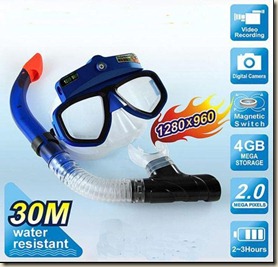
Underwater Camera Mask

underwater camera 

I discovered these the other day and thought they were a pretty interesting concept..  Usually underwater cameras are something you basically hold out in front of you and guess.  But with this style, you are basically wearing the camera, and where you look, is what you are shooting.  I couldn’t really give you a personal review on the item, however I did find it interesting that they are available with a fair bit of technology.    For instance this blue mask has a 4G Hard Drive and is a digital camera/video camera,

Product Specification:
2.0 mega pixels CMOS camera high resolution clear digital video recording
Unique magnet switch control, indicated by motor shaking
Motional video recording, instant respond to surrounding light
In-built power cell support up to 2.5 hours long video recording and photographing
Tempered glass lens with anti-fog feature
Ergonomic design, wide viewing angle, comfortable wearing
Power Supply:built-in 360mAh lipolymer battery
Camera hardware resolution: 2.0m  pixels.
Built-in 4GB flash memory, support max 32GB
Minimum illumination required: 1Lux
Power Consumption :  < 0.59W
Power duration: 2.5 hours
Power Adaptor: 5V DC/500 mAh
Resolution: 1280*960
Recording Speed: 30fps
Audio: Mute underwater
Video Format: AVI

Depth=30 M

specs-goggles

The yellow one is has a smaller hard drive, and a slightly different design, both with the same general concept though. Specs:

Technical Specifications:
Image Resolution - 5.0MP CMOS Sensor
Internal Memory - 16MB NAND Flash Memory
External Memory Card - Micro SD Card
Video Mode - 18-25FPS @ VGA
Status Display - LCD Display
Interface - USB
Power - 2 AAA Alkaline 1.5V Batteries
Photographic Distance - 1.2m (5ft)
Auto Off System time - 120 seconds

Modes
High Res - 5.0MP (2560x1920) - 29 Pics
Video - 53S VGA
(Image Qty is based on 16MB internal Memory -
Add a Micro SD Card to add memory up to 2Gb)

Depth = 5 M

Both were found on Ebay   :D  Enjoy your summer fun!

Tuesday, July 20, 2010

Back To Class

Well, today is the day for classroom, e:class style!  Photography technology is constantly changing as I”m sure you know, and along with the hardware changes, come the often greater changes in software.  Understanding or even realizing the tools are available in the software you are using is incredibly important.  As a result, I continue to regularly take classes, often online, like with this e:class being presented tomorrow by world renown teacher/software developer: Kevin Kubota.  The class begins at 10AM PST, so we won’t get it here till1pm, but it is scheduled for a full 90 minutes, and includes a video download of the course afterwards, along with live Q&A.  Well worth the “tuition fee”.   Looking forward to learning all the latest and greatest that Lightroom 3 has to offer.  For more details on how you can get in on the class, go HERE.

kubota

Saturday, July 17, 2010

David Jay compares iphone to android

I Love this, I think it is great that someone actually goes out and tries something, and compares it honestly, rather than simply going with the philosophy of – Apple is the best.  I really feel that Apple markets extremely well, but when it comes to actual product advantages, I think we need to do much more research, instead of simply believe what a company tells us.  Take a look at what David Jay’s research is, might make you think before you leap towards the latest and greatest iphone4.

 David Jay did a survey of what people like most about their iphones, take a look at what he found:

“I'd ask why people love their iPhone and no joke the ONLY two responses I got from dozens of people were:
1. It looks sexy. 2. It has an Apple logo on it. “

Here's a video of all the reasons I ditched my iPhone for Google's Nexus One. Right now if you have the latest version of Android 2.2 it's A LOT better than the iPhone.
With Android I can:
• Multitask (run GPS Navigation, Pandora and more all at the same time)
• Integrate Google Voice which is a sweet free service from Google. Apple removed and banned this app from the iPhone
• Amazing turn-by-turn GPS included. Apple makes you pay an extra monthly charge for this.
• Turn my phone into a mobile WiFi Hot Spot and connect other devices to the internet. iPhone doesn't allow this.
• Adobe Flash - Apple also blocked this so iPhone users are forced to buy apps from their stores instead of playing Flash games online.
• Adobe and Google partnered up and Adobe gave them access to their API so camera and image editing features on the Android are already more advanced then the iPhone.
• Android is an open system that developers are free to develop for without fear of having their creations rejected whenever Apple feels threatened.

…off for a wedding today – and it looks like the sun is coming out – just in time!

Wednesday, July 14, 2010

Polarizing Lenses

Polarizing Lenses So today I picked up a new pair of sunglasses – polarizing sunglasses – I Really like polarizing lenses – it’s almost like you are wearing perscription lenses because it makes everything look so much sharper.    Well, the same is true when it comes to adding a polarizing filter to your camera lens.  The benefits of using a polarizing filter are obvious, removing the glare from light reflecting on an object in your image, and getting more dramatic colouring are just a couple of the advantages you will find.  Take a few moments to watch the video below by DSLR Tips.com on polarizing filters, it is very informative, and worth the 6 minutes.  ps.  my new glasses – Arkona Gas Station 2 for $5…I Really like my new sunglasses :D

Tuesday, July 13, 2010

Sports Photography

Sports photography is not something I specialize in.  That said, if you are into photography, and your children are involved in sports…you’re bound to pull out your camera :D   One thing to keep in mind when doing sports photography is that you will need a faster shutter speed, 1/500 to 1/1000 of a second tend to be a good range  to work with, depending on how fast your subjects are of course.  In my situation, I was shooting in doors at night.  This poses additional complications since I am going to some how need to get more light to the sensor since I’m using a fast shutter speed.  Can you name two options I have to maintain proper exposure?

Blog it board